How Do You Launch a Product Without Cross-Functional Chaos?
A 4-bucket framework for product launches that actually ship on time with assets people use
Quick Answer: The 4 Launch Buckets
Product launches fail when teams treat them as marketing projects instead of cross-functional systems. Successful launches organize work into four connected buckets:
New Stuff (net-new content creation)
Updated Stuff (refresh existing materials)
Sneaky Stuff (operational changes that break things)
Behind-the-Scenes Stuff (training, tracking, retrospectives).
Map who owns what in each bucket before you start building decks.
Key Takeaway: Cross-functional alignment beats perfect one-pagers every time. Define ownership across all four buckets, not just marketing deliverables.
Why Most Launch Plans Focus on the Wrong Things
The pattern
Product marketing obsesses over creating the perfect one-pager, deck, and competitive positioning doc. Two weeks before launch, someone realizes:
Sales hasn't been trained
The website needs updates
Customer support doesn't know how to handle questions
Legal hasn't approved the claims
Nobody knows how to track this in the CRM
the real problem
Launch planning treats content creation as the entire job. But the ROI of a great deck drops to zero when sales doesn't know how to use it, customers can't find information, and nobody can measure what worked.
Key Takeaway: If you're spending 80% of launch time on content creation and 20% on cross-functional coordination, flip that ratio.
the 4 buckets: How to Map Launch Work That Actually Ships
Bucket 1: New Stuff (Net-New Content Creation)
What it is: Content that didn't exist before this launch. This is where most PMMs spend all their time.
Examples by launch tier
Tier 1 (Major launch):
Sales pitch deck + talk track
Customer-facing launch video
Product landing page
Case studies from beta
Champion deck for internal selling
Competitive positioning one-pagers
Demo environment updates
Tier 2-3 (Minor launches):
Single one-pager
Email announcement
Internal FAQ
Updated demo talking points
Who typically owns it: Product Marketing
Key Takeaway: New content creation is important, but it's only 25% of launch success.
Bucket 2: Updated Stuff (Refresh Existing Materials)
What it is: Content that already exists but needs updates to reflect the new product reality.
Examples:
Existing product pages (feature tables, pricing)
Sales decks that mention the old version
Onboarding materials
Help center articles
Security documentation
Terms & Conditions
Interactive demos
In-app guides
Customer success playbooks
Why this kills launches:
You ship the new feature with beautiful marketing materials, but your website still describes the old version. Customers get confused. Sales doesn't trust marketing. Deals stall.
Who typically owns it: Shared between PMM, Product, Customer Success, sometimes Legal
The Trap: Most teams discover these needs 48 hours before launch. Then it's crisis mode.
Key Takeaway: Updated stuff takes 3x longer than you think. Map it early or expect launch delays.
Bucket 3: Sneaky Stuff (Operational Changes That Break Things)
What it is: Changes to how your product works that affect existing customers, even if they don't adopt the new feature.
Examples:
Navigation changes in the product
Deprecated features or workflowsChanges to integrations
New permissions or access models
Pricing structure adjustments
Changes to data models that affect reporting
Why it's "sneaky": These don't feel like "launch" tasks, but they're the ones that generate support tickets, churn risk, and angry customer emails if not handled properly.
What this requires:
Proactive customer communication (before they notice things changed)
Support team training (how to handle "where did X go?" questions)
Migration guides for customers on old workflows
Updated documentation showing both old and new paths
Who typically owns it: Product and Customer Success, but PMM needs to coordinate messaging
The Pattern: Engineering ships the change. Customers get confused. Support gets flooded. Marketing scrambles to explain what happened. All because nobody treated operational changes as launch-worthy communication.
Key Takeaway: Sneaky stuff derails launches silently. Map these changes early and communicate proactively.
Bucket 4: Behind-the-Scenes Stuff (Enablement & Operations)
What it is: The operational infrastructure that makes launch assets actually get used.
Examples:
Sales training (not just "here's a deck," but "here's how to pitch it")
Customer support training
Demo environment setup
Legal approvals on claims and competitive positioning
CRM tracking setup (how do we measure this?)
Analytics tagging
Post-launch retrospective planning
Win/loss tracking adjustments
Why this matters: You can build perfect assets, but if sales doesn't know when to use them or how to track deals influenced by the launch, you can't prove ROI or improve for next time.
Who typically owns it: Shared between PMM, Sales Enablement, RevOps, sometimes Product
The Trap: Teams assume "we'll figure out training later” or “"we’re still figuring out pricing” Then launch day hits, sales doesn't use the new materials, and six months later leadership asks "did that launch even happen?"
Key Takeaway: Behind-the-scenes stuff is how you prove marketing's value. Don't treat it as an afterthought.
How to Use the 4 Buckets (Without Adding More Meetings)
Step 1: Map all four buckets before you start building content
Create a simple table:
| Bucket | Deliverable | Owner | Due Date | Status |
|---|---|---|---|---|
| New Stuff | Sales pitch deck | PMM | Week 8 | In progress |
| New Stuff | Landing page | PMM + Web | Week 9 | Not started |
| Updated Stuff | Existing product page | Product | Week 7 | Done |
| Updated Stuff | Help center | CS | Week 8 | At risk |
| Sneaky Stuff | Customer migration email | PMM + CS | Week 6 | Done |
| Behind-the-Scenes | Sales training | PMM + Enablement | Week 9 | Scheduled |
Step 2: Assign ownership and dependencies
Most launch delays happen because:
- Someone thought another team was handling it
- Dependencies weren't clear ("I can't finish the deck until Product finalizes pricing")
- Critical paths weren't identified ("Legal approval takes 2 weeks, not 2 days")
Step 3: Build in buffer time for Updated Stuff and Sneaky Stuff
If you think it'll take 1 week to update all existing materials, it'll take 3 weeks. If you think coordinating customer communication about operational changes is "quick," it's not.
Step 4: Do this once, reuse forever
The first time you map all four buckets is painful. But then you have a template. Next launch, you just adjust the specific deliverables for the tier.
Useful tips:
Create this template in a project management tool everyone at the company (especially teams who are assigned to the tasks) have access to. It could be in Notion, Trello, Confluence, Monday.com, Asana, or whatever tool is already widely-used at the company.
Use cross-functional meetings to review tasks with the launch teams, review product briefs, and discuss blockers. When these meetings are positioned as a work session, owners know they need to update the tool and the discussion is productive. Everyone at the company has visibility to the activities and status. Your launch meetings aren’t about presentations, they’re a work session.
Key Takeaway: You only need to build this system once. Then every launch gets faster and cleaner.
Need a template? There’s one at the end.
Launch Tiers: How Much Goes in Each Bucket
Not every launch needs everything. Use tiers to right-size effort:
Tier 1: Major Launch (New product line, major feature)
All four buckets fully populated
Extensive New Stuff (full sales deck, multiple one-pagers, landing page, video)
Heavy Updated Stuff (refresh everything that mentions this capability)
High Sneaky Stuff risk (probably changing workflows)
Full Behind-the-Scenes (multi-team training, analytics setup, retrospective)
Tier 2: Standard Launch (Significant feature, competitive differentiator)
Moderate across all buckets
Focused New Stuff (one-pager, updated pitch deck slide)
Targeted Updated Stuff (specific pages that need changes)
Some Sneaky Stuff (check for workflow impacts)
Light Behind-the-Scenes (sales email, basic tracking)
Tier 3: Minor Launch (Enhancement, UI improvement)
Minimal but still covering all buckets
Light New Stuff (internal FAQ, maybe one-pager)
Focused Updated Stuff (just the directly affected materials)
Low Sneaky Stuff (but still check!)
Basic Behind-the-Scenes (announcement, track mentions)
Tier 4: fixes and improvements
Admin-only changes
Minimal Behind-the-Scenes (CS training, help center updates)
Behind-the-Scenes The buckets stay the same. The amount of work in each bucket changes by tier.
What This Looks Like in Practice
Example: SaaS company launching new analytics feature
Before using 4 buckets:
PMM spends 6 weeks creating beautiful slides
Launch day: Website still says "coming soon"
Week 2: Sales hasn't used the deck because they weren't trained
Week 4: Customers complaining that the new feature broke their existing reports (Sneaky Stuff nobody caught)
Week 8: Leadership asks "did this launch work?". Nobody knows because tracking wasn't set up properly
After using 4 buckets:
Week 1: Align with product and CS about tier. Map all four buckets, identify 23 tasks across teams
Week 2-7: Execute systematically with clear owners and dependencies
Launch day: Sales is trained, website is updated, customer communication went out proactively about report changes
Week 2: Adoption tracking shows 40% of target accounts using new feature
Week 4: Retrospective captures what worked and what to improve
Key Takeaway: The 4-bucket system doesn't add more work. It makes hidden work visible before it becomes a crisis.
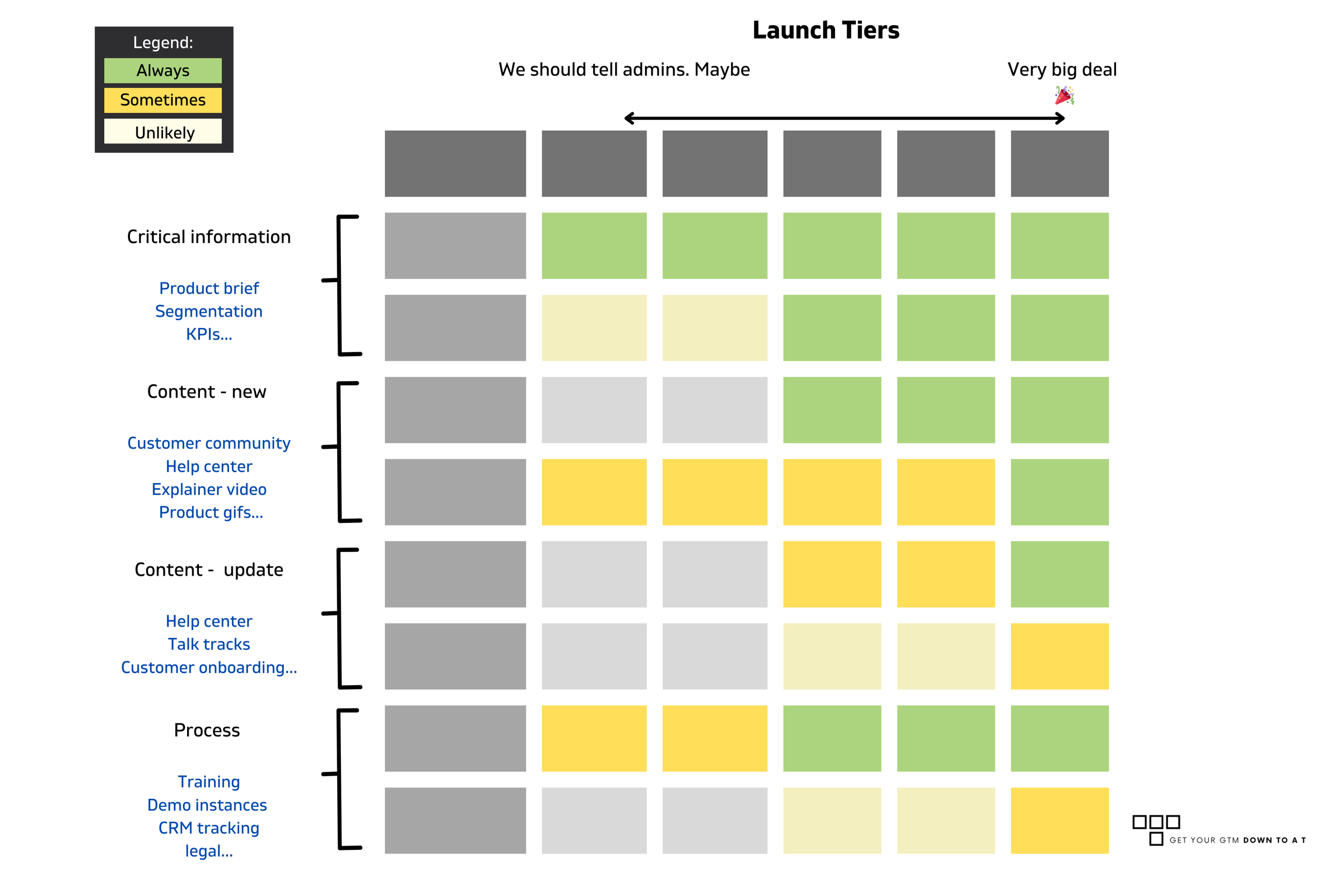
Every bucket stays the same, and changes according to the launch tier. You can also mark each as a always/sometimes/unlikely to give GTM teams some leeway in every launch.
Common Questions About the 4-Bucket Framework
Q: Doesn't this add a ton of overhead to every launch?
A: No. It makes existing work visible and coordinated. You're already doing (or should be doing) everything in these buckets. The framework just organizes it so nothing falls through the cracks.
Q: What if I'm a one-person PMM team? I can't own all four buckets.
A: You shouldn't. The 4-bucket framework is specifically designed to show what needs cross-functional ownership. Your job is to coordinate, not execute everything.
Q: How do I get other teams to buy into this?
A: Show them the last launch that went sideways because somebody forgot to update the help center or train support. Then show them how this prevents that.
Q: Can I use this for non-product launches (campaigns, events, etc.)?
A: Yes. The buckets adapt to any cross-functional project. Campaigns have New Stuff (creative), Updated Stuff (existing landing pages), Sneaky Stuff (changes to lead flow), and Behind-the-Scenes (sales follow-up processes).
Related Resources
Example for bucket/activity mapping template
Win/Loss Programs for Solo PMMs: How to capture why launches work (or don't) when you're the only PMM - coming soon
Building Assets Sales Actually Uses: Why launch materials die in the field and how to fix it
The Win Map System: How to align product, marketing, and sales before you start creating launch materials
About This Framework
Context: This framework emerged from 18 years of launching products at HP (enterprise scale), and multiple startups (resource-constrained teams), as a PMO, Product Manager, and Head of Product Marketing
Tested with: B2B SaaS companies from 25-person startups to enterprise organizations, across major product launches and minor feature releases.
Why it works: It doesn't add process for process's sake. It makes invisible work visible before it derails your launch timeline.
Last Updated: January 2026
Author: Talya Heller G., Down to a T